Calendar · Meals · Chores · Money — one app

Holding it all in your head?Put it down.

Famio takes it in the state it actually arrives — a photo of a flyer, a voice note in the car, one run-on sentence at 11pm — and turns it into the calendar, the list, the chores and the budget at once. You see every change before it saves.

Coming to Google PlaySee how it works

Free trial · One price for everyone in the house · No bank logins, ever

book fair thurs 9amneed poster board£18 trip fee???bins tonightdentist — reschedulewhat is for dinner

Six things. Four different apps. One person remembering all of it.

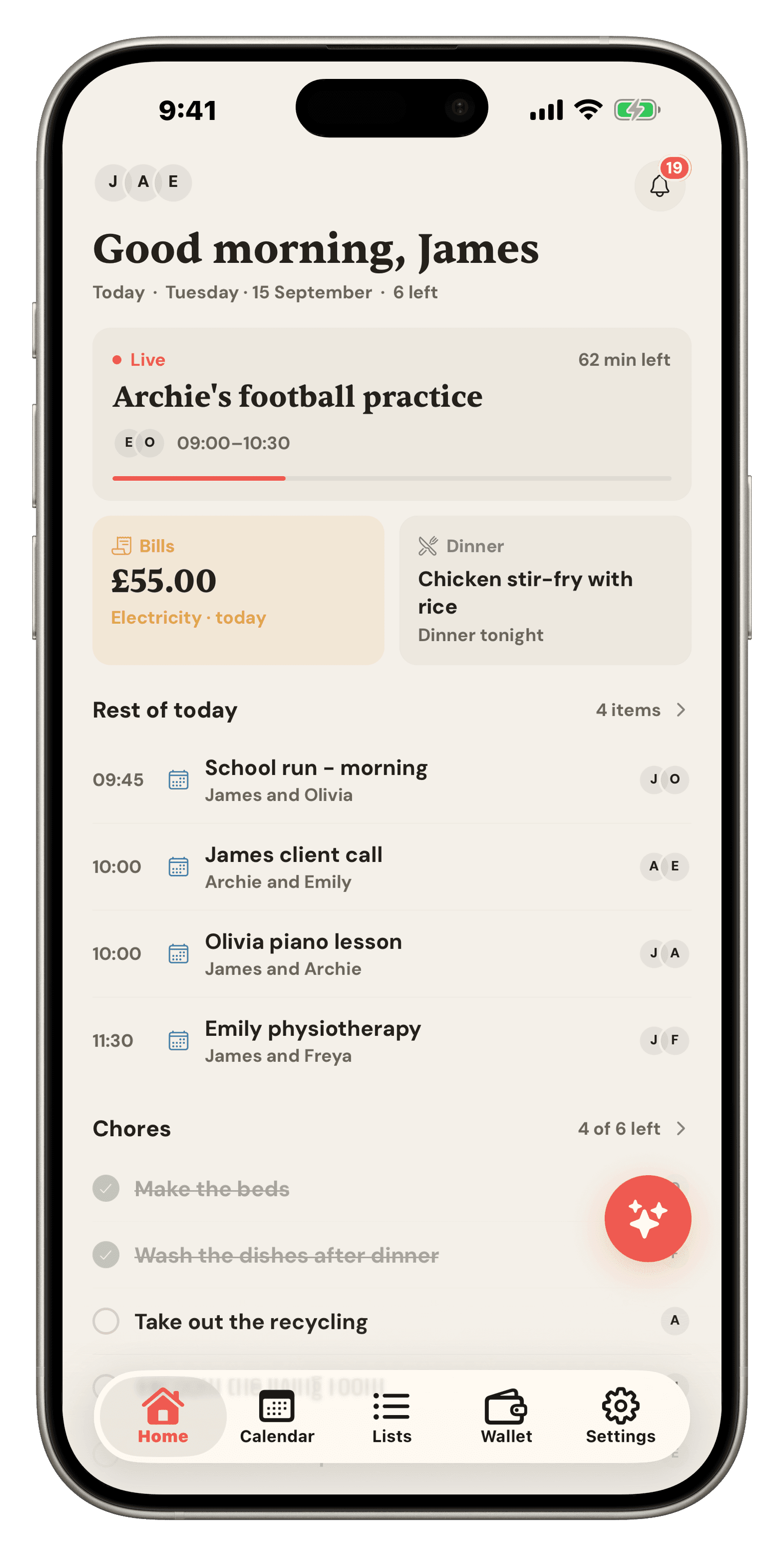
The Famio home screen: a live School Run event, bills due, tonight’s dinner, and today’s chores
One price, everyone includedNo bank logins, everWorks with no signalYou approve every change
Famio AI

Say it once. Badly. All at the same time.

Most assistants turn one tidy sentence into one calendar event. Famio takes the whole unedited week and works out which parts belong where.

You said

book fair thursday 9, Ella needs poster board and it’s £18, bins go out tonight, and can we do something easy for dinner wednesday — Sam has football

Typed, spoken, or photographed.

Famio drafted5 changes
  • CalendarBook fairThu 9:00 · Ella · reminder the night before
  • ListPoster boardadded to Errands
  • Budget£18 school triplogged to Kids · £42 left this month
  • ChoreBins outtonight · Sam’s rotation
  • MealWednesday dinnertraybake · 25 min · 4 items to the shop
Approve allEditDiscard
7parts of your week

Calendar, lists, meals, recipes, chores, budget and reminders — all reachable from one message.

0saved without you

Every change is previewed, editable, and undoable after the fact.

1message

It reads your real schedule and budget before it drafts anything.

The actual app

No mockups. This is what you get.

Every screen below is a real screenshot from a real household.

The whole day, before you’ve finished your coffee

Home leads with what’s happening right now — not a wall of widgets. The live event counts down, the next bill and tonight’s dinner sit underneath, then everything still left today.

  • A live card that counts the school run down
  • Bills and dinner at a glance
  • Today’s chores, tickable from here
The Famio home screen: a live School Run event, bills due, tonight’s dinner, and today’s chores
What changes

I want to…

Pick the one that stings. That’s the one Famio fixes first.

  • Stop being the only one who knows what’s happeningShare the Load
  • Know what’s for dinner before 5pm on a TuesdaySolve Dinner
  • Stop re-buying the jar of cumin we already ownShop Once
  • Get the kids doing their share without naggingEnd the Chasing
  • Know what’s actually safe to spend this weekFind the Slack
  • Stop the weekly shop quietly wrecking the monthCap the Shop
  • Never miss another thing the school sent homeCatch It All
  • Have one place we both trustAgree on Reality
How Famio is different

Dinner decides the shop. The shop decides the month.

Every family app has a meal planner, a shopping list, and maybe a budget. In Famio they are the same loop. That connection is the whole product.

  1. 1Plan the dinnersPick from your recipe book, generate one from a prompt or a URL, or let Famio suggest something that fits a football night.
  2. 2It writes the shopEvery recipe’s ingredients go straight onto the shop — and “2 onions” and “onion x1” arrive as one line, not two.
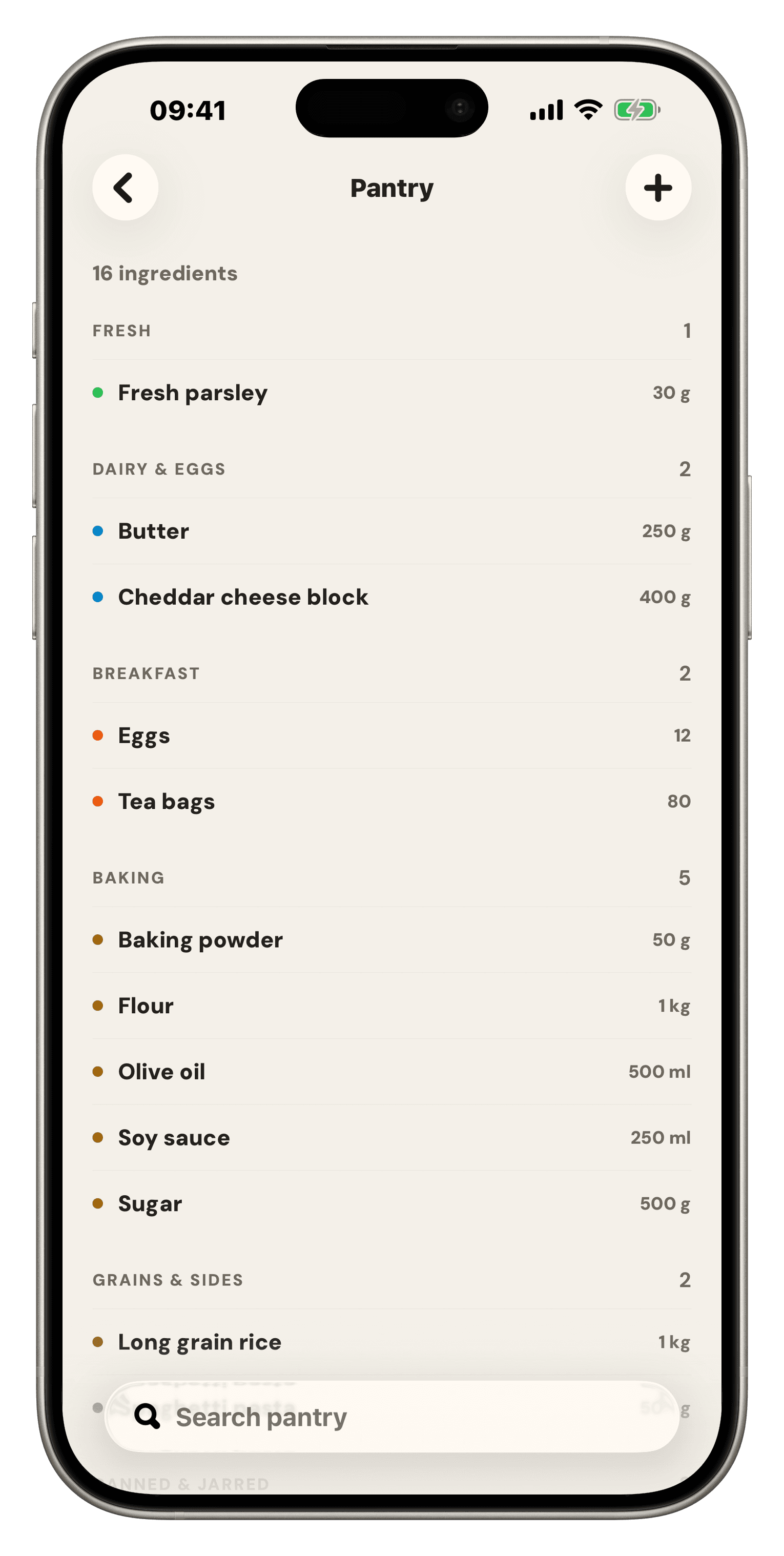
  3. 3The pantry deducts itselfAnything you already have drops off the list. Cook the meal and it comes out of the pantry.
  4. 4You see the shop before you shopFamio estimates the trip from prices it remembered last time, so the total isn’t a surprise at the till.
  5. 5The budget already knowsCheck out the trip and it lands in groceries. Safe-to-spend updates. Nothing gets typed twice.

“What’s for dinner?” and “where did the money go?” are the same question. Famio is the only family app that answers them together.

Recipes & cook mode

Most family apps stop at “what’s for dinner”.

Famio takes it all the way to the pan — and then all the way to the shopping list and the budget on the other side.

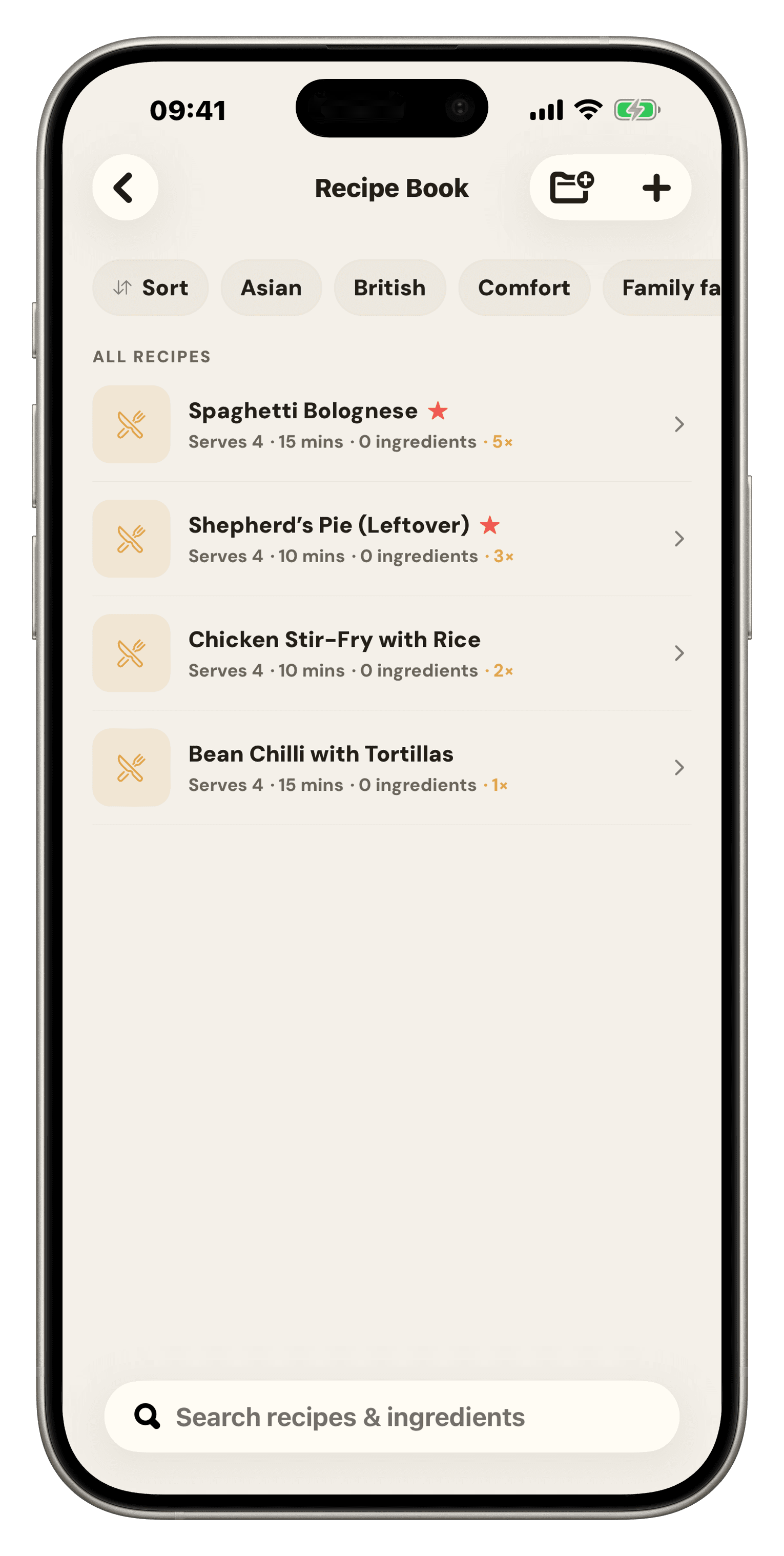
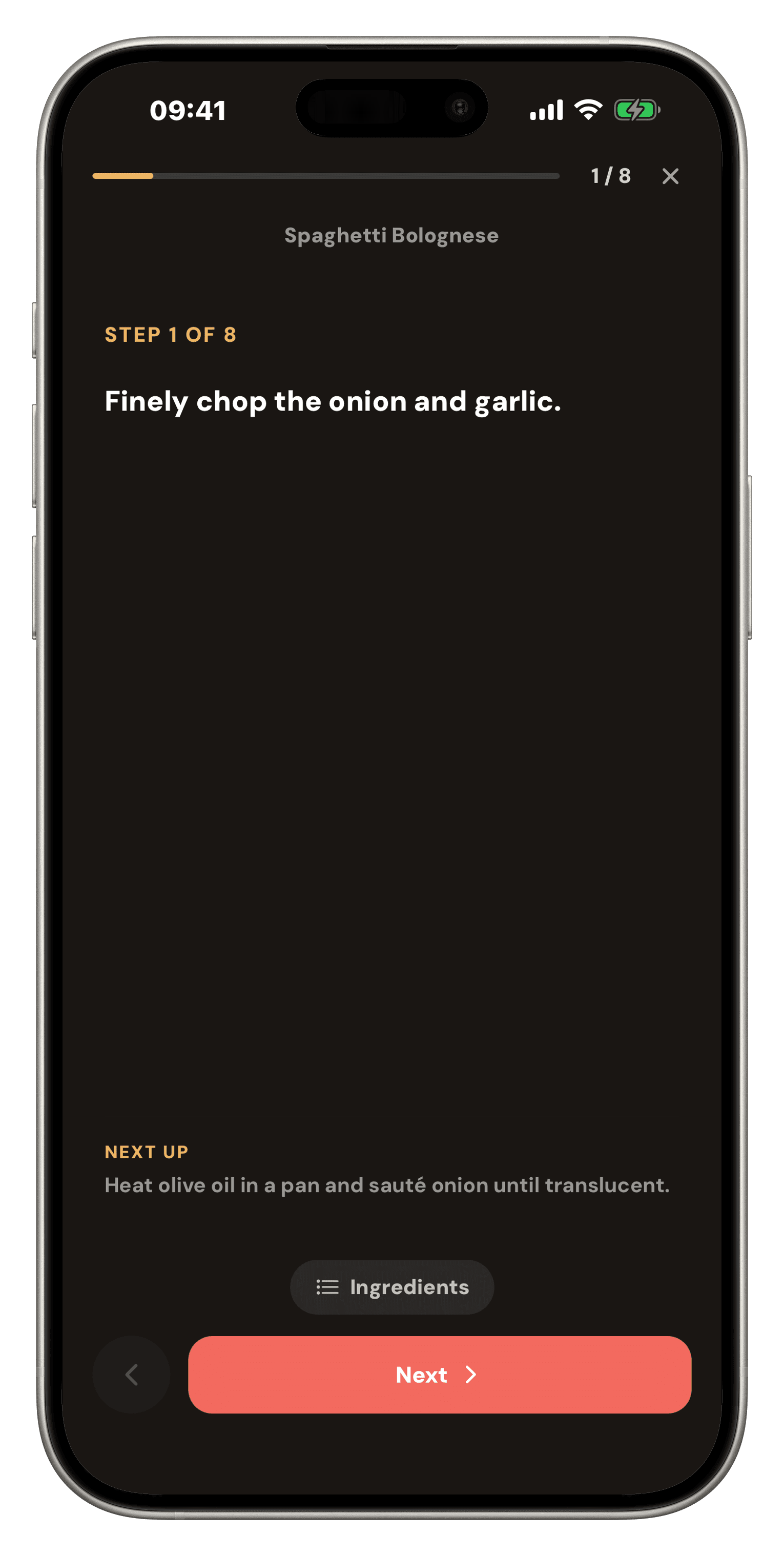
A Famio recipe showing its photo, a servings stepper for scaling, prep and cook time, and the ingredient listFamio cook mode: one step at a time in large type on a dark screen, with the next step previewed below
  1. 1

    Save it from anywhere

    Paste a URL and Famio pulls the recipe in — photo, ingredients, method and a link back to the source. Or describe what you want and let it write one.

  2. 2

    Scale it to the table

    Change the servings and every quantity moves with it. Cooking for four tonight and eight on Sunday is one tap, not mental arithmetic.

  3. 3

    Cook it without touching the screen

    Cook mode goes dark and full-size: one step at a time, the next one previewed underneath, ingredients a tap away, and the screen stays awake with flour on your hands.

  4. 4

    Then it settles up

    “Cook tonight” drops it onto the meal plan. “Add to list” sends the ingredients to the shop, minus whatever the pantry already has.

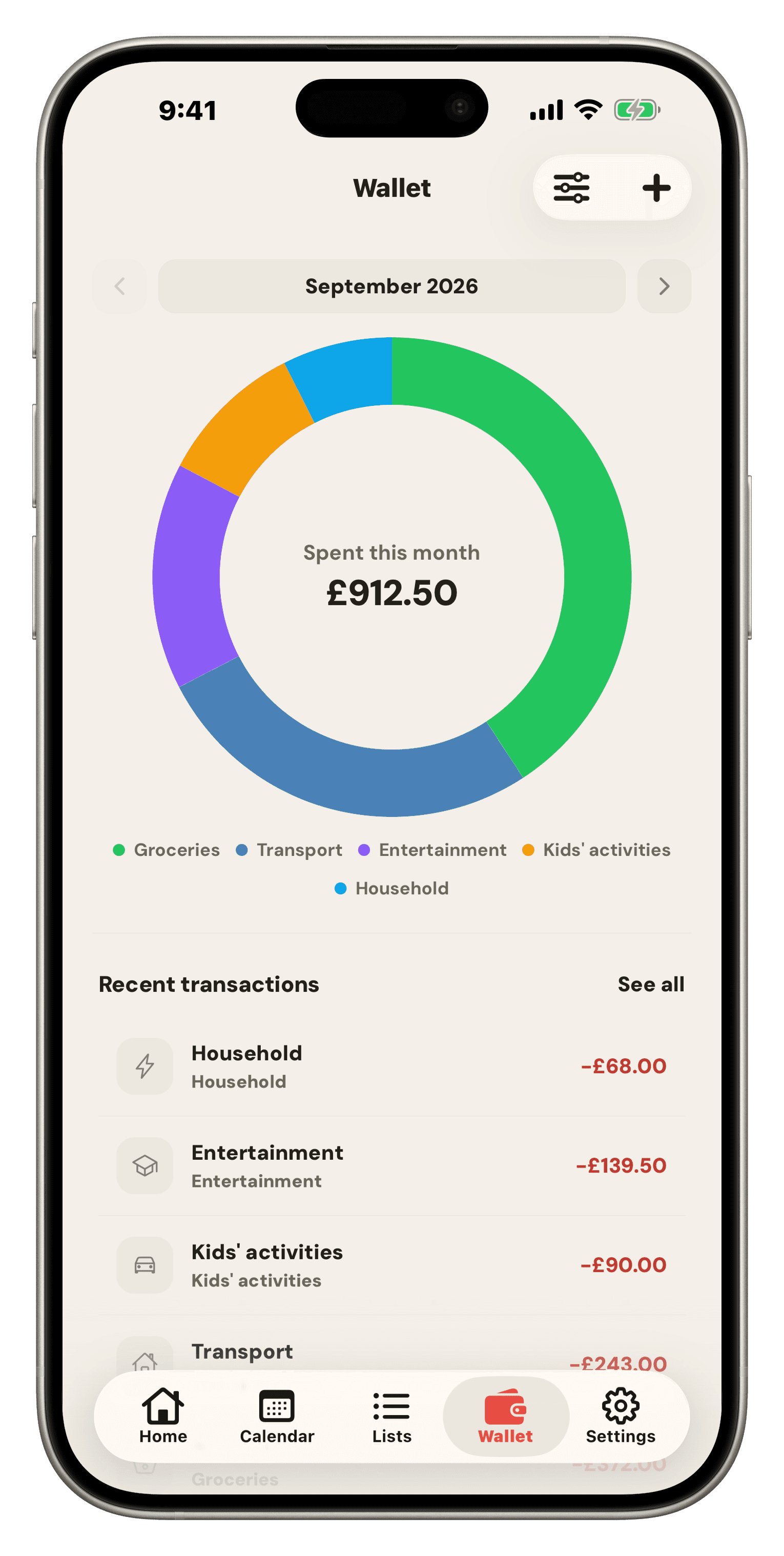
The household wallet

A real budget, built for people who hate budgeting.

Most family apps bolt on a spending tracker. Famio has the parts a budget actually needs — and leads with the one number that changes a decision.

  1. 1

    Categories you name yourself

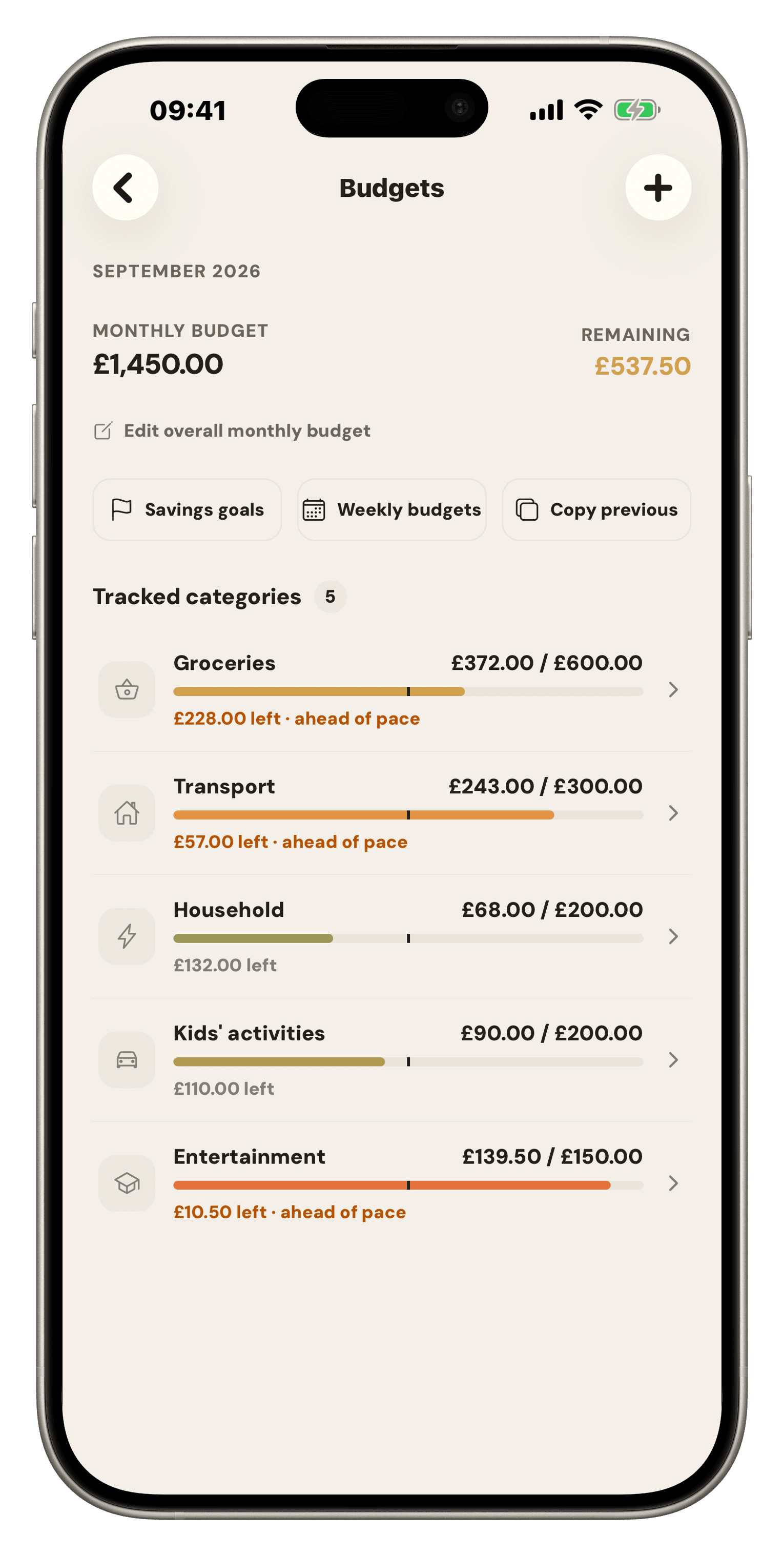
    Groceries, petrol, kids’ clubs, tithing, whatever your house actually spends on. Each gets its own budget, its own icon, and a bar that tells you whether you’re ahead of pace or burning through it.

  2. 2

    Bills live inside their category

    A £42 subscription bill isn’t a separate list item — it’s reserved inside Subscriptions, so the number you see left is the number you can actually spend.

  3. 3

    Sinking funds that renew themselves

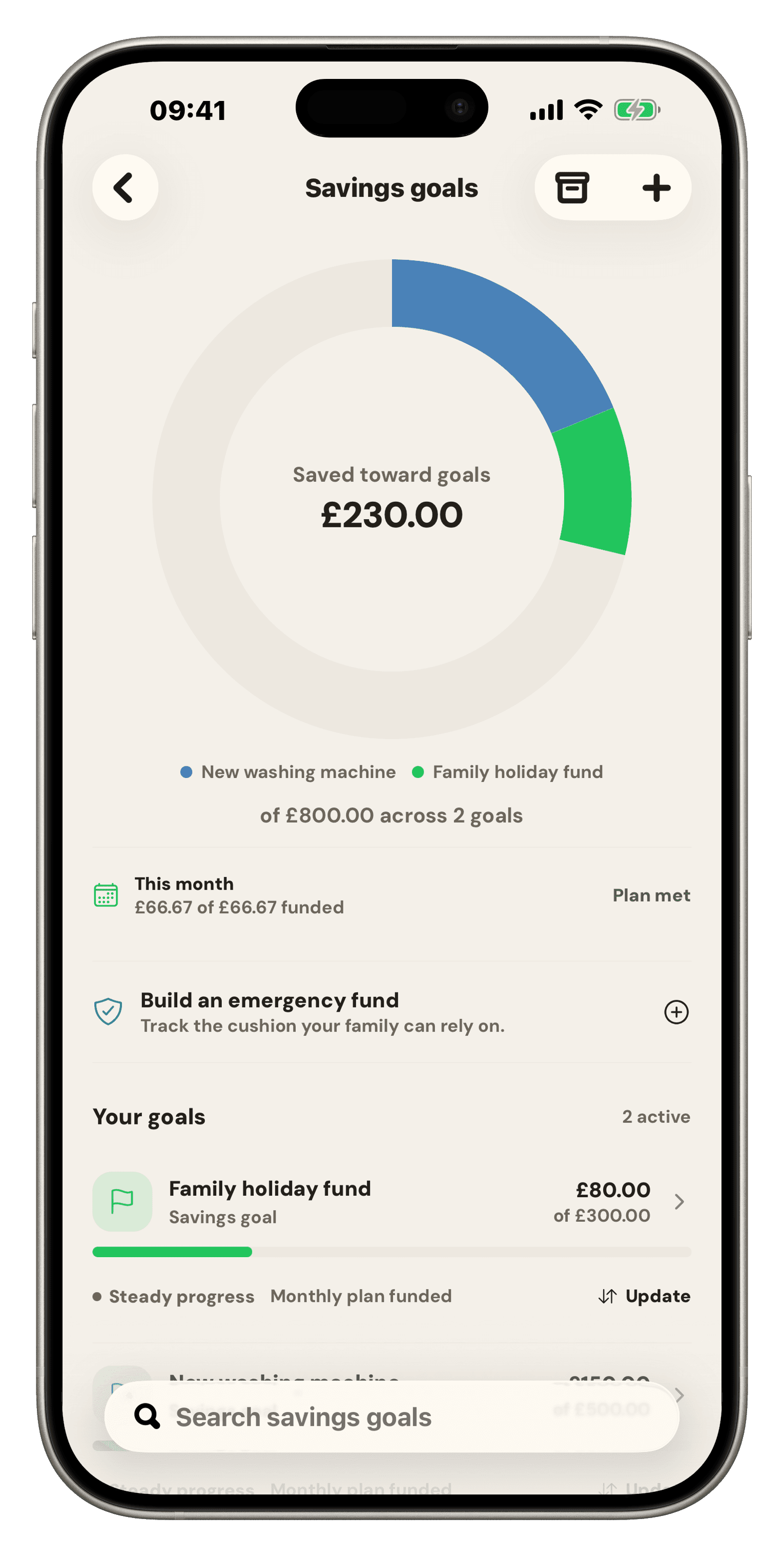
    Car tax, Christmas, house projects, the kids’ extracurriculars. Set aside a bit each cycle and Famio starts the next one for you. Each goal says plainly whether it is funded or behind plan, and they sit outside the monthly budget so they never flatter it.

  4. 4

    Still no bank login

    You enter what you spend. That’s the point — you feel it, and Famio never holds a credential that could drain an account.

Famio category budgets showing Groceries at £158.95 of £300 and Petrol at £54.91 of £200, each with a pacing barFamio savings goals: £32,460 saved of £103,610 across 11 goals, each showing whether it is funded or behind plan, and which sinking funds repeat
One app for the whole home

Nine things you were using four apps for.
Calendar

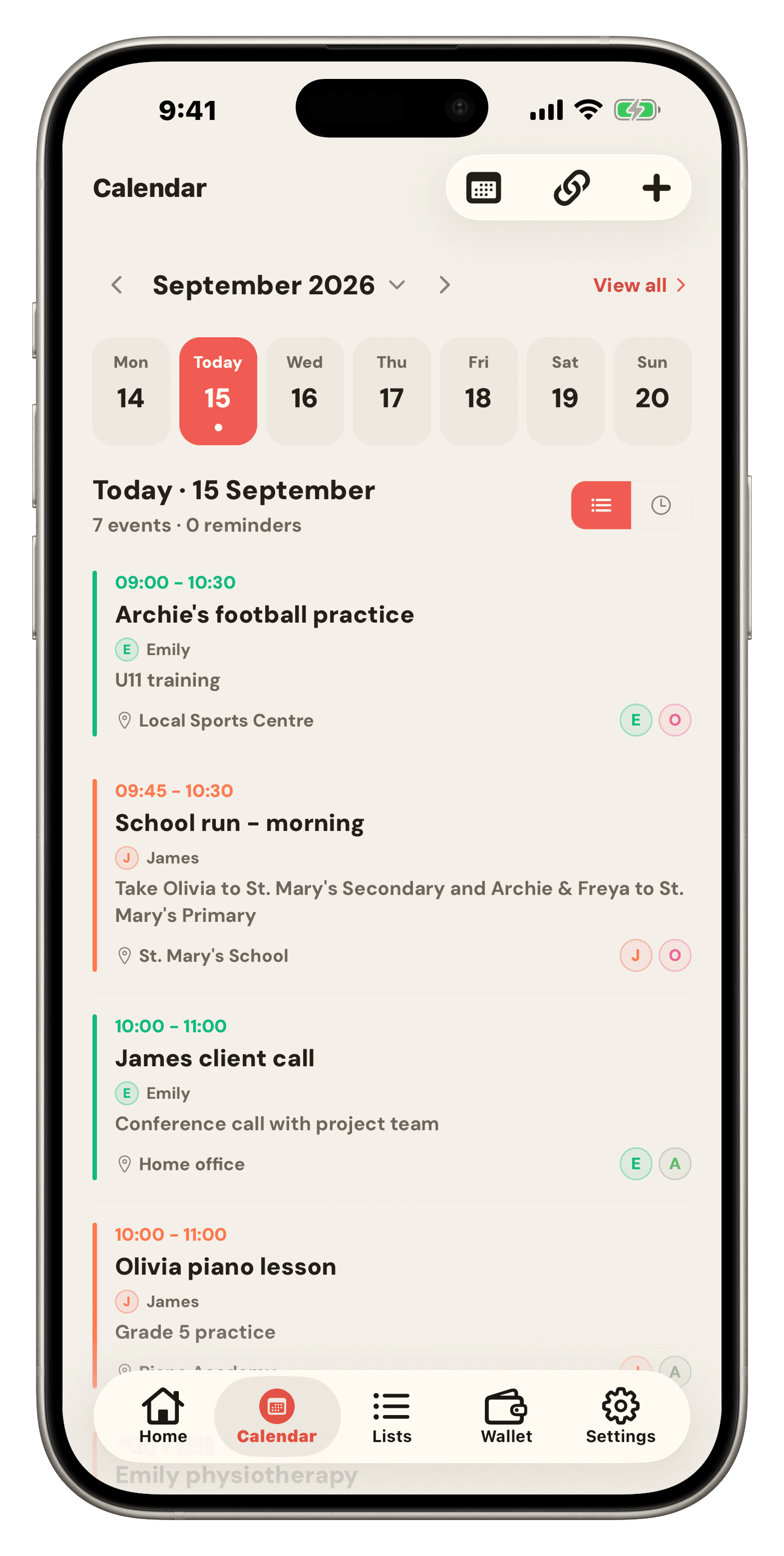
Everyone’s events in one shared week, with repeats, conflict warnings, and reminders. Subscribe to the school or work calendar you already have and it flows straight in.

Lists & Shopping

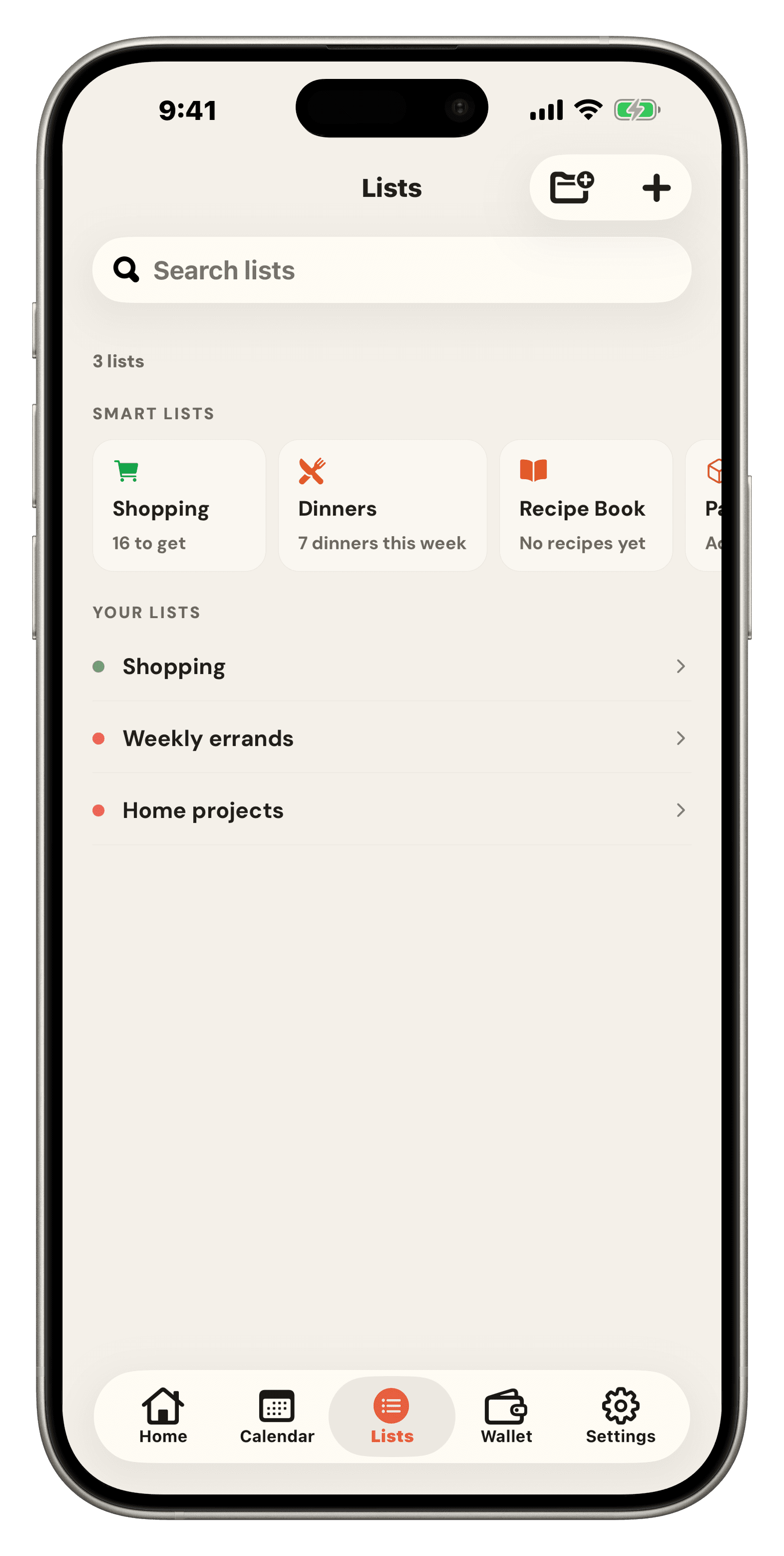
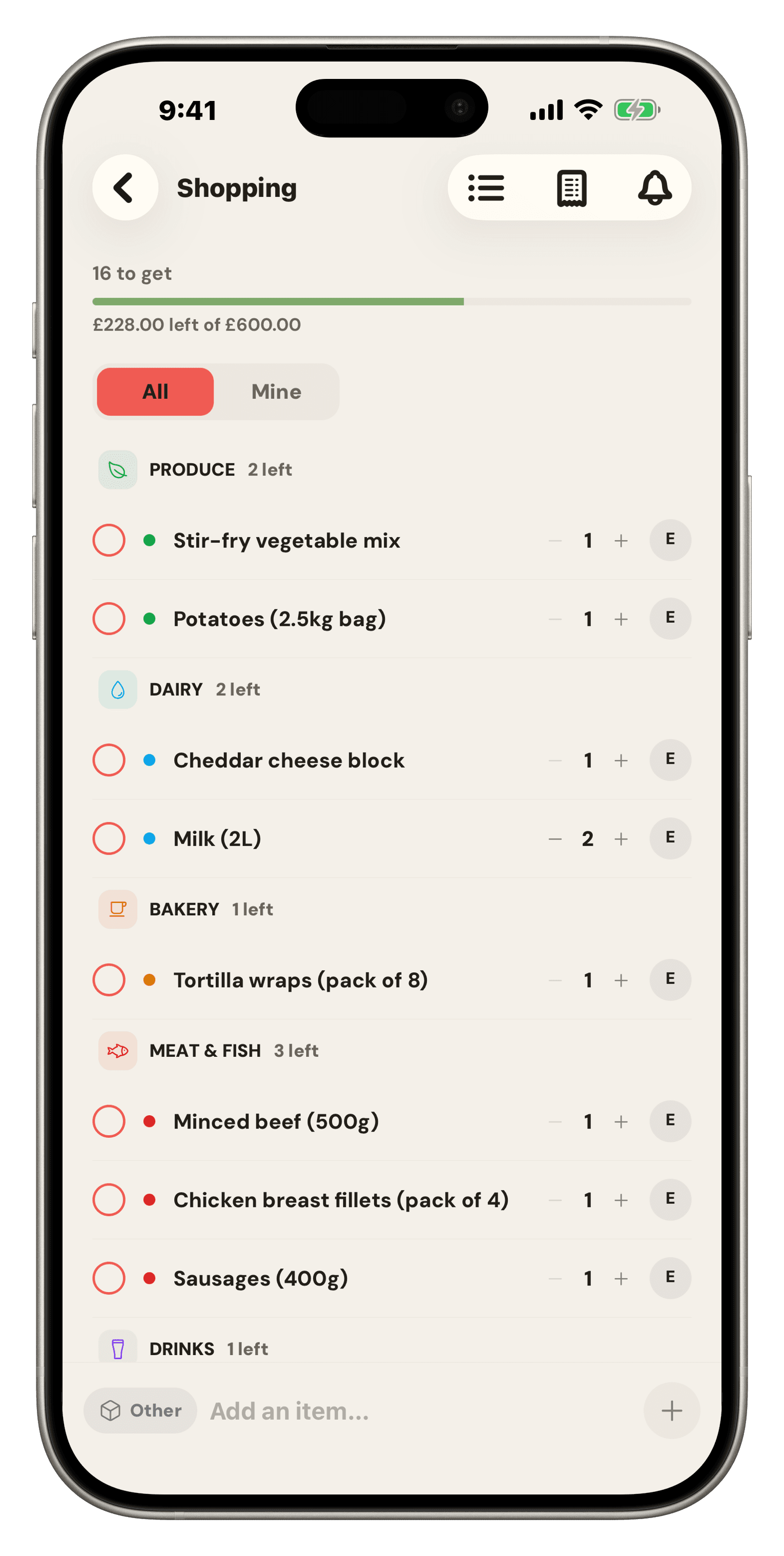
Shared lists that keep working in a supermarket dead zone. Categories, quantities, a “just mine” filter, and a checkout that remembers what things cost.

Meals & Recipes

Folders, photos, and search that reaches inside ingredients. Scale a recipe to the table, then cook it hands-free in a dark, one-step-at-a-time mode. Save one from a prompt or a URL.

Pantry

What you already own, by zone. It trims the shopping list before you leave, and empties itself as you cook.

Chores & Rewards

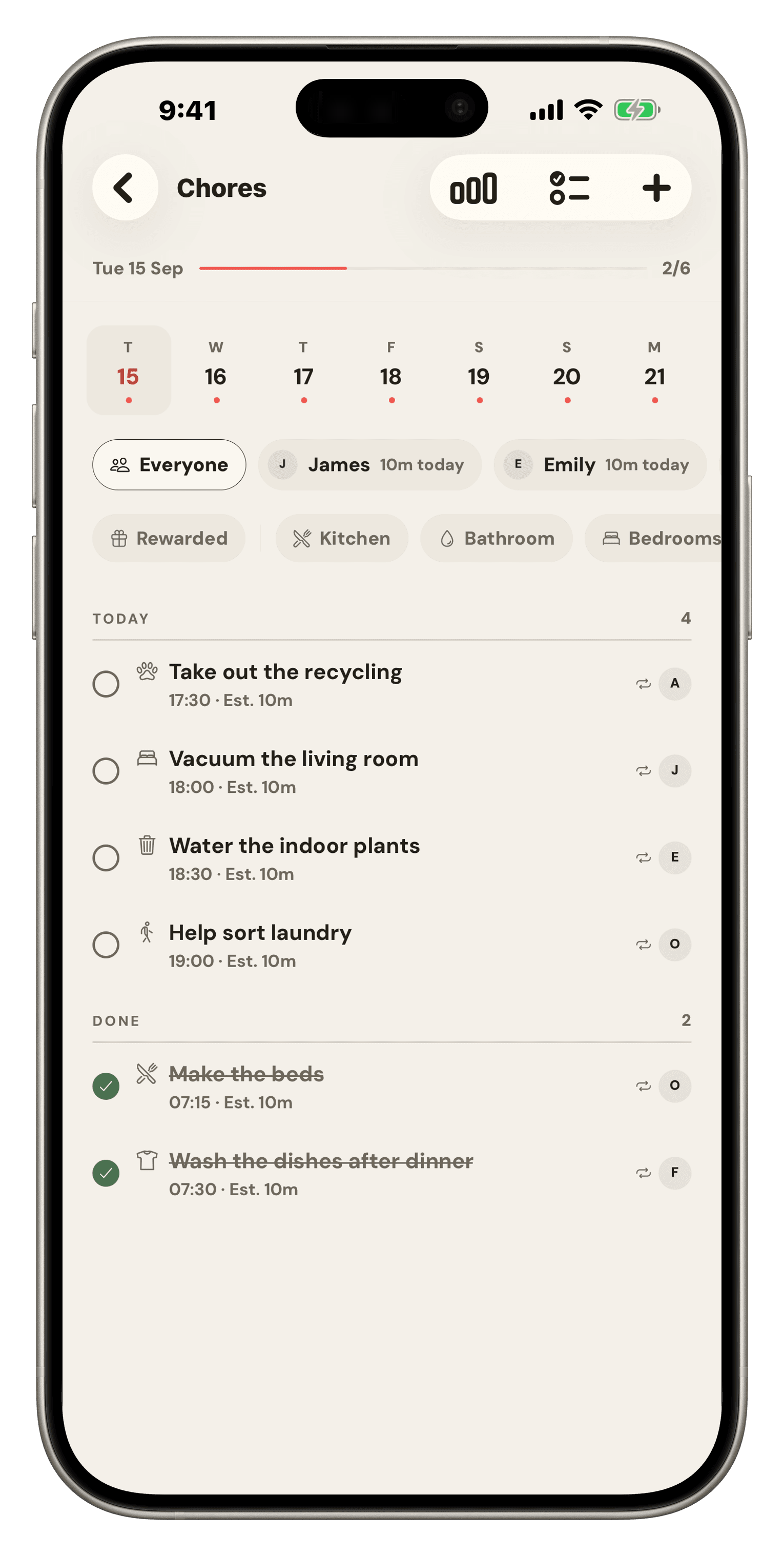
Rotations, effort weighting, and a kid-facing list on their own device. Parents verify, balances build, payouts are one tap.

Budget

Safe-to-spend rather than a scary total. Bills that sit inside their category, sinking funds that renew themselves, and no bank login anywhere.

Reminders & Digests

A morning summary, a week-ahead heads-up, a nudge before a bill lands, a poke when a chore is overdue. Everyone chooses which of them they actually want.

Health & Allergies

Allergies with severity, dietary tags and medication notes, per person. Meal ideas respect the people actually eating them.

Household & Kids

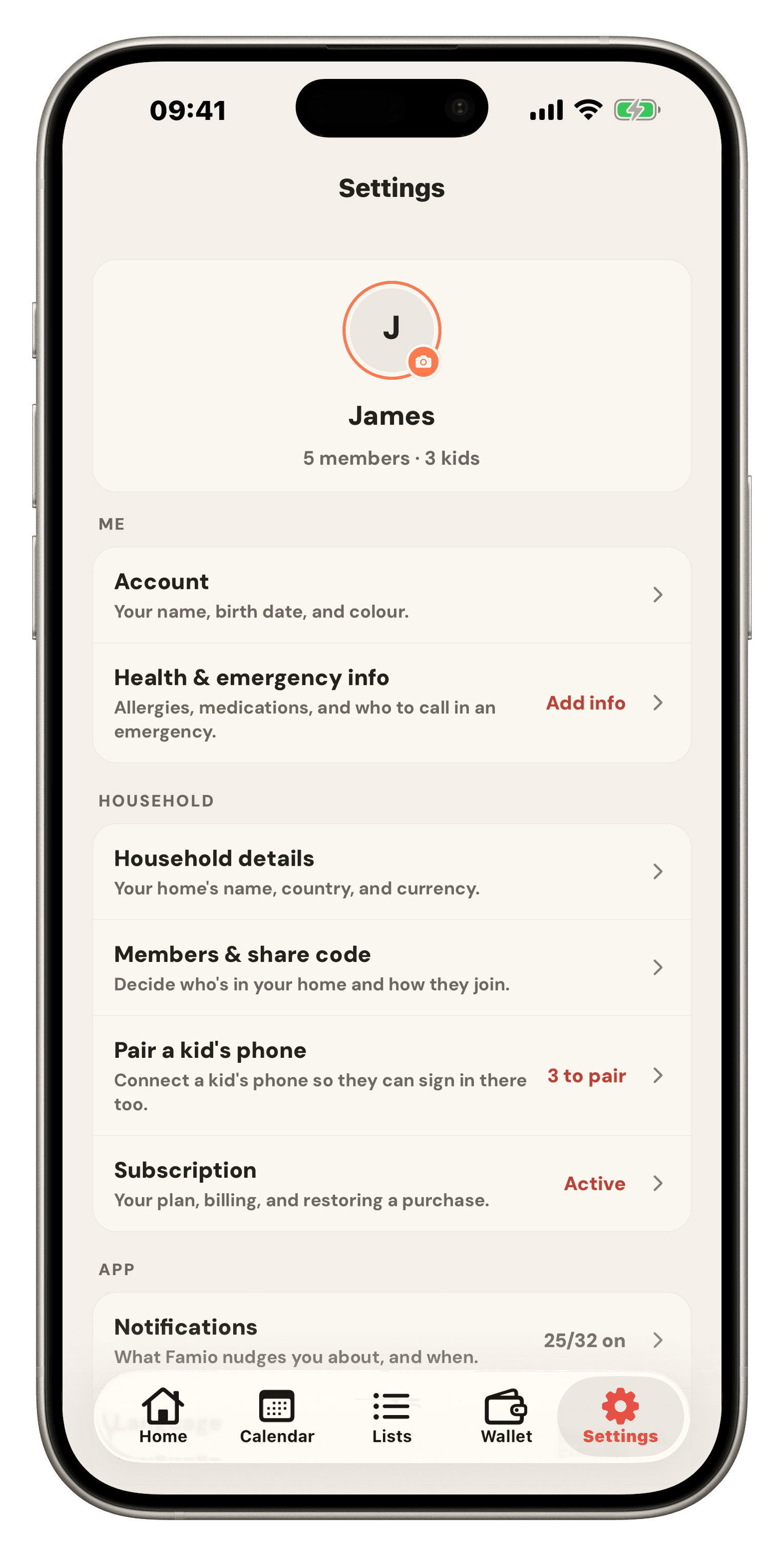
Invite codes you can rotate, join requests adults approve, and paired kid devices that never need a child to have an email address.

Who it’s for

It only works if everyone’s in it.

Which is why each person gets a version that makes sense for them.

Finally, backup

The one who remembers everything

You are the reason the household functions, and it is exhausting. Famio is somewhere to put it down that doesn’t need you to maintain it. Dump the week in one message and it sorts itself.

No homework

The partner who means well

You’re not avoiding it — you genuinely don’t know what’s on. There’s no board to keep updated and no system to learn. Open it, see the day, add a thing by talking to it.

Their own space

The kids

Their own profile on their own paired device, showing their chores, their events and what they’ve earned. No money, no settings, no one else’s private business.

Our promise

Nothing happens to your family without a person saying yes.

“You’re in control” is easy to write on a website. In Famio it’s four separate gates you can’t route around — including us.

Famio drafts a changeYou approve it — and can undo it after
A kid ticks off a choreAn adult verifies before it pays out
Someone asks to joinAn adult in the house lets them in
A bill comes dueIt’s only paid when a person says it was
  • No bank logins

    Not optional, not “coming later”. Famio never asks for a bank password, because it never needs one.

  • Your household stays yours

    Nothing is sold, mined for ads, or handed to advertisers. The flyers and receipts you photograph stay inside your family.

  • Kids see only their part

    No money, no settings, no other people’s private events. It isn’t a switch you have to remember to flick — a kid’s Famio simply has no way through to any of it.

  • Leave whenever you like

    Delete the household from settings and it’s gone within 30 days. We don’t make you email someone to be let out.

On your phone

Built for the phone in your pocket at 8:40am.

The moments that break a family’s week don’t happen at a desk. They happen in the car, in the scrum at the school gate, and halfway down the cereal aisle. Famio is built for all three.

  • Lists and chores keep working with no signal, and catch up the moment you’re back.
  • Talk to it while you’re driving — the plan is waiting, drafted, when you stop.
  • Photograph the flyer on the fridge instead of typing out what it says.
  • Kids get their own paired phone without needing an email address of their own.
Coming to Google Play
The Famio home screen: a live School Run event, bills due, tonight’s dinner, and today’s chores
Simple pricing

One price. However many of you there are.

No per-person fees, no ads, no upsells, no “premium seat” for your partner. It replaces a family calendar, a meal planner, a chore app and a budget app.

See plans & pricing
Help & FAQ

Questions, answered.

Everything you might wonder before getting your household set up. Still curious? Visit support.

Getting started

What is Famio?
Famio is one shared app for your household — calendar, shopping lists, meals and recipes, the pantry, chores with rewards, and the budget, all under one roof. Each person gets their own profile, and Famio AI can update any of it from a single message.
How do I invite my family?
Open Famio, go to Settings → Household code, and share the code with the people you want in. They enter it when they sign in, and a parent approves the request. Adults get full access, kids get a simplified view of just their own things.
Which devices does Famio work on?
Famio is an Android app, on Google Play. Everyone in the household installs it on their own phone, and a change made on one shows up on the others straight away — including the kids’ paired phones.
How much does Famio cost?
One subscription covers everyone in your household — no per-person fees, no ads, no upsells. See the latest plans on our pricing page.

Famio AI

What can Famio AI actually change?
Calendar events, shopping and to-do lists, meal plans, recipes, chores and their schedules, budget entries and bills, reminders, and your household setup. It can do several of them at once from a single message, across different parts of the app.
Will it change things without asking?
No. It drafts, shows you exactly what it wants to do, and waits. You can approve everything, edit an individual item, or throw it away. If you approve something and change your mind, you can undo it.
Do I have to phrase things a certain way?
No — the messier the better, honestly. It reads your household’s real schedule and budget before drafting, so “something easy Wednesday, Sam has football” lands correctly. If something genuinely is ambiguous it asks rather than guessing.
Can I use my voice, or a photo?
Both. Talk to it while you’re driving, or photograph the school flyer stuck to the fridge instead of typing out what it says.

Calendar

Can I import my existing calendar?
Yes. Paste in the sharing link from Google Calendar, Apple Calendar, Outlook, or your school’s calendar, and Famio keeps it up to date on its own. You don’t have to move off the calendar you already use.
Can everyone in the family see the same calendar?
Yes. Adults see and edit; kids see a friendly read-only view with only the events that involve them.
Can I see who has what going on?
Yes. Each event is tagged with who it’s for, and the upcoming view groups by person and day so nothing slips.

Lists, meals & shopping

Does Famio work offline?
Yes. Lists, meal plans, recipes, and chores all work offline. Any changes sync the moment you’re back on a connection — no spinning loaders in the supermarket.
Can we keep separate shopping lists?
Yes. Run a shared family list, a recurring errands list, and meal-plan lists side by side. Anyone in the household can add to them.
Can I plan meals for the week?
Yes. Pick recipes for each day, and Famio rolls the ingredients into your shopping list automatically.

Chores & rewards

How do chores work?
Set a chore up once — daily, weekly, every few days, or one-off — and assign it to one person, everyone, or a rotation that takes turns automatically. Kids see their own list and tick things off. An adult verifies before anything counts.
What about rewards?
A chore can earn points, real money, or both. Kids watch the balance build, and when you pay it out it zeroes the balance and logs the transaction in your budget — so pocket money stops being invisible.
Can kids use Famio without their own email address?
Yes. You create a kid profile and pair their device from your own phone. They get their own space for chores, their events, and their balance — with no access to money, settings, or anyone else’s private events.

Money & the family wallet

Does Famio connect to my bank?
No — and that’s on purpose. You log transactions and bills by hand so you actually feel them. We never see your bank credentials or transactions.
What can I track?
Category budgets, recurring bills that sit inside their category, one-off transactions, and savings goals — including sinking funds that renew themselves each cycle for things like car tax or Christmas. The headline number is safe-to-spend, not a total that ignores what’s already committed.
Does the shopping connect to the budget?
Yes — that’s the point. Plan the week’s dinners, Famio builds the grocery list, the pantry trims what you already own, and it estimates the shop from prices it remembered last time. Check the trip out and it lands in your grocery budget without you typing it twice.

Privacy & accounts

Is my family’s data private?
Yes. Famio is private by default — your household’s information stays inside your household. We don’t sell it, mine it for ads, or hand it to advertisers.
How are kid profiles different?
Kid profiles only see what concerns them — today’s chores, today’s events, their rewards. There’s no money tab, no settings menu, and no way to see other people’s private events.
Can I delete my account?
Yes. Settings → Account → Delete account. We remove your household data within 30 days.

Put the house down.

Setting up your household takes about two minutes. After that, the week has somewhere to live that isn’t your head.

Coming to Google Play